When it come to optimizing system performance Linux kernel tuning is one of the most powerful tools at your disposal. Whether you are running a high traffic web server a resource intensive database or a bare metal server fine tuning the Linux kernel can dramatically improve performance responsiveness & scalabilitys. we walk you through the essential techniques of Linux kernel tuning and resource management to ensure your Linux system operates at its full potential.
The Linux kernel serve as the heart of your system managing how hardware resources are allocated and utilizeds. Effective kernel tuning is crucial for addressing performance bottlenecks such as CPU overloads memory management issues and slow disk I/O. specific kernel parameter you can make your system run faster and more efficiently which is especially important for high performance application that demand consistent uptime and low latency.
We also cover the most commonly used performance optimization tools and the best practices for monitoring and adjusting kernel setting. you will be equipped with the knowledge and skills to fine tune your Linux systems for maximum performance ensuring it can handle even the most demanding workloads with ease.
Introduction to Linux Kernel Tuning and Resource Management
Linux Kernel Tuning is the practice of adjusting kernel parameters and system settings to optimize how the Linux operating system manages hardware resources. kernel as the core of Linux is responsible for scheduling processes managing memory controlling I/O and handling networking. While Linux defaults are sufficient for general purpose use high performance workloads such as database servers virtualization hosts hightraffic web application and containerized environments require deliberate tuning.
Resource management in Linux ensures that CPU & memory & disk and network resources are allocated efficiently. Without tuning applications may suffer from delay high latency or resource starvation even on powerful hardware. Linux Kernel Tuning is not only about improving speed but also about stabilizing the system achieving predictable performance and maximizing throughput.

Why Tuning Matters
- Predictable Application Behavior: Reduce the variability in response times during peak loads.
- Improved Resource Utilization: Avoids overcommitment of memory or underutilization of CPU cores.
- Lower Latency: Critical for the real time application high frequency trading and streaming workloads.
- Stability Under Load: Prevents crashes or performance degradation during intensive operations.
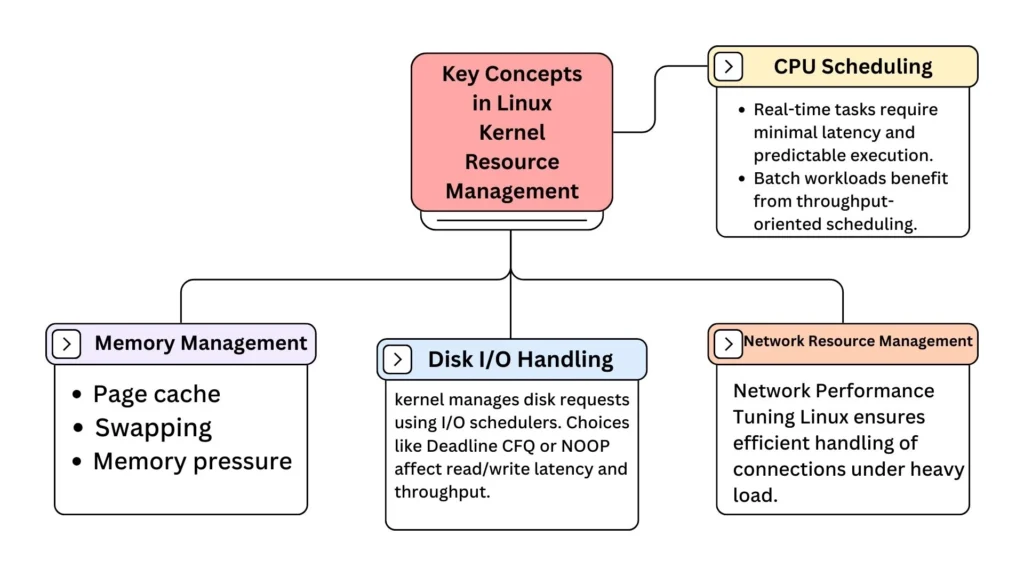
Key Concepts in Linux Kernel Resource Management
Effective resource management is crucial for ensuring optimal performance in any Linux based system. Linux kernel resource management lies the kernel ability to efficiently allocate and manage critical system resources such as CPU memory disk I/O and networking. kernel interact with these resources allows you to make informed decisions when tuning your system for maximum efficiency.
CPU Scheduling
The kernel schedule CPU time for all processes. default Completely Fair Scheduler (CFS) balances workloads but may not suit specialized environments…
- Real-time tasks require minimal latency and predictable execution.
- Batch workloads benefit from throughput-oriented scheduling.
Tuning parameters like sched_latency_ns, sched_min_granularity_ns & CPU affinity can improve CPU Scheduling Linux performance for specific workloads.
Memory Management
Memory allocation involves both physical RAM and virtual memory.
concepts include..
- Page cache: Caches frequently accessed files in memory to reduce disk reads.
- Swapping: Moves inactive pages to disk when RAM is full.
- Memory pressure: Occurs when available memory is low triggering frequent swapping and page reclaim.
Linux Memory Optimization often involves adjusting vm.swappiness, vm.vfs_cache_pressure & enabling Transparent Huge Pages to reduce page table overhead.
Disk I/O Handling
The kernel manages disk requests using I/O schedulers. Choices like Deadline CFQ or NOOP affect read/write latency and throughput. Proper disk tuning ensures critical processes do not get blocked by slower operation.
Network Resource Management
Networking involves handling packets & buffering and interrupt processing. Kernel parameters like TCP window sizes buffer sizes and interrupt coalescing affect latency and throughput. Network Performance Tuning Linux ensures efficient handling of connections under heavy load.
Common Linux Performance Bottlenecks and How to Address Them
Even the moderns Linux system can face performance bottleneck. Identifying and addressing these is the first step in effective kernel tuning.

CPU-Related Bottlenecks
- High load averages and CPU contention indicate misbalanced process scheduling.
- Single threaded applications may not utilize multiple cores efficiently.
Solutions..
- Pin critical processes to specific cores using CPU affinity.
- Adjust scheduler parameters for latency sensitive workloads.
- Monitor CPU usage per core with
mpstatorhtop.
Memory Bottlenecks
Symptoms include frequent swapping slow application startups or high page fault rates.
Optimization Steps..
- Adjust
swappinessto control swap usage. - Fine tune cache pressure (
vm.vfs_cache_pressure). - Use Huge Pages for memory-intensive applications like databases.
Disk I/O Bottlenecks
High I/O wait slow writes and long read times indicate disk performance issues.
Tuning Techniques..
- Choose the correct I/O scheduler for your workload.
- Adjust read-ahead and write back interval.
- Separate logs and database files to reduce contention.
Network Bottlenecks
Symptoms include packet loss high latency or slow data transfer.
Network Tuning Methods..
- Monitor traffic with
ssoriperf. - Adjust TCP buffer sizes and window scaling.
- Optimize NIC interrupt handling.
Essential Tools for Linux Performance Tuning
Before making any changes accurate measurement is critical. Linux provides several builtin and thirdparty tools..
CPU Monitoring
top/htop: Real time CPU and process usage.mpstat: Per core CPU statistics.uptime: Load averages.
Memory Monitoring
freeandvmstat: Memory and swap usage.smem: Detailed process level memory consumption.
Disk Monitoring
iostat: Disk utilization and I/O wait.iotop: Identifies processes with high I/O.dstat: Combines cpu & disk and network metrics.
Network Monitoring
ssandnetstat: Connection status and socket stats.iperf: Measures throughput.nload: Real-time network traffic visualization.
Kernel Parameters to Modify for Maximum Linux Performance
Kernel parameters control the system’s low-level behavior. effective tuning can drastically improve Linux System Performance Tuning.

CPU-Related Parameters
sched_latency_nsandsched_min_granularity_ns: Control scheduling responsiveness.isolcpus: Isolate CPUs for dedicated tasks.irqbalance: Distributes interrupts across CPUs for efficiency.
Memory-Related Parameters
vm.swappiness: Controls swap aggressiveness.vm.dirty_ratioandvm.dirty_background_ratio: Control when dirty pages are written to disk.vm.vfs_cache_pressure: Balances cache reclamation.
Disk I/O Parameters
- Adjust read-ahead (
blockdev --setra) for sequential workloads. - Choose an I/O scheduler based on workload (deadline NOOP CFQ).
- Tweak
nr_requeststo control queue depth for high throughput disk.
Network Parameters
net.core.rmem_maxandnet.core.wmem_max: Adjust TCP buffer sizes.net.ipv4.tcp_fin_timeout: Reduces time sockets stay in FIN_WAIT.net.core.netdev_max_backlog: Increases maximum queued packets.
Memory Optimization Techniques for Enhanced Performance
Memory is one of the most critical resources in Linux and proper management directly impact systems speeds & stability. Linux Kernel tuning for memory ensures that applications get sufficient RAM while minimizing unnecessary swapping and maximizing cache efficiency.
Understanding Memory Usage
Linux categorizes memory into..
- Used memory: Actively allocated by processes
- Cached memory: Used to store frequently accessed files for faster retrieval
- Buffers: Temporary storage for I/O operations
- Swap: Disk-based memory used when RAM is insufficient
Monitoring the memory usage with vmstat, free and smem helps identify bottlenecks and inefficiencies.
Swap Management
Excessive swapping slows the system dramatically.
tuning strategies..
- Adjust swappiness (
- Lower swappiness (e.g. 10–20) for servers that need memory for active processes.
- Monitor swap usage to prevent performance degradation.
- Avoid placing swap on slow disks SSDs can mitigate but not eliminate the impact.
Page Cache and Huge Pages
- Page cache stores frequently accessed files in memory. Properly balancing cache usage avoids excessive I/O reads and writes.
- Transparent Huge Pages (THP) reduce memory fragmentation and TLB misses for large memory applications like databases and virtualization workloads.
- Consider using static Huge Pages for predictable memory-intensive workloads especially in enterprise servers.
Kernel Parameters for Memory Tuning
vm.vfs_cache_pressure: Controls how aggressively the kernel frees inode/dentry caches.vm.dirty_ratioandvm.dirty_background_ratio: Control how much memory can hold unwritten dirty pages before flushing to disk.- Proper adjustment ensures memory is not wasted but also prevents I/O spikes.
Improving Disk I/O Performance on Linux Systems
Disk I/O often becomes the primary bottleneck in database servers file server and high traffic application. Linux Kernel tuning can optimize disk throughput and reduce latency.

I/O Schedulers
Linux provides multiple I/O schedulers..
- Deadline: Optimized for predictable low latency access. Ideal for databases.
- CFQ (Completely Fair Queueing): Default for general workloads, balances fairness among processes.
- NOOP: Minimal scheduler best for SSDs where the device handles I/O scheduling.
File System Tuning
- Enable write-back caching for better throughput but monitor for potential data loss risks.
- Disable unnecessary metadata updates like
atimeto reduce disk writes. - Ensure file system alignment with disk block size to prevent unnecessary I/O operations.
Reducing Disk Wait
- Separate high traffic workloads onto different disks to avoid contention.
- Monitor queue length and latency using
iostatoriotop. - Optimize RAID configurations for redundancy and performance.
CPU Scheduling and Affinity for Optimal Performance
The CPU scheduler is central to Linux Kernel Tuning because it determines which processes get executed.
Understanding Scheduler Behavior
The default CFS scheduler aims for fairness but may not be ideal for..
- Latency sensitive workload (e.g real-time services)
- Heavy batch processing
Tuning scheduler parameters can reduce latency and improve throughput.
CPU Affinity and Pinning
Binding processes to specific CPU cores provides several benefits..
- Reduced cache misses
- More predictable performance
- Isolation of critical workloads from background tasks
Tools like taskset or cset can manage CPU affinity, which is crucial for High-Performance Linux Configuration.
Interrupt Handling
Network and disk interrupts can overload a single CPU causing performance degradation.
- Spread interrupts across multiple cores using
irqbalance. - Adjust interrupt coalescing for NICs to reduce CPU overhead.
Proper CPU tuning ensures stable performance under high load.
Networking Tuning for Low Latency and High Throughput
TCP and UDP Buffer Optimization
- Increase buffer sizes (
net.core.rmem_max ornet.core.wmem_max) for high-throughput workloads. - Adjust TCP window scaling and congestion control for faster connections.
Connection Management
- Increase the maximum number of connections (
net.core.somaxconn) to handle high load servers. - Optimize
net.ipv4.tcp_fin_timeoutto recycle sockets faster.
Network Latency Reduction
- Disable unnecessary features like TCP timestamps if not needed.
- Fine-tune NIC parameters for interrupt moderation.
- Use monitoring tools like
iperfto validate tuning effects.
These techniques are essential for Network Performance Tuning Linux especially in enterprise server environments.
Advanced Kernel Optimization Strategies for High-Performance Applications
High demand applications such as databases virtualization hosts and large scale servers require deeper Linux Kernel Tuning.
NUMA-Aware Optimization
On NUMA systems..
- Keep memory allocations local to the CPU node to reduce latency.
- Use
numactlto manage process memory placement. - Monitor NUMA statistics for bottlenecks.
NUMA aware tuning significantly improves Linux Kernel Configuration for Speed.
Real-Time Kernel Features
real time application..
- Enable loe latency kernel patches if necessary.
- Use real-time scheduling classes for critical tasks.
- Monitor latency with tools like
cyclictest.
Custom Kernel Builds
In some environments, removing unused modules and features:
- Reduces kernel size
- Improves boot times and runtime performance
- Provides better control over resource allocation
This is advanced Linux Kernel Optimization for specialized high-performance workloads.
Best Practices for Ongoing Kernel and Resource Management
Linux Kernel Tuning is an ongoing process. Systems evolve workloads change and what worked last month may need adjustment today.
Continuous Monitoring
- Use performance monitoring tools (
htop,vmstat,iostat,ss) regularly. - Compare metrics before and after tuning to validate improvements.
- Identify regressions or new bottlenecks early.
Documentation and Change Management
- Record all kernel parameter changes and their impact.
- Maintain version controlled tuning script for repeatability.
- Avoid blind experimentation; test changes in staging environments first.
Workload-Specific Tuning
- Tailor tuning to application type: web server or database & container or bare metal host.
- Avoid overtuning aggressive changes can destabilize otherwise stable systems.
- Re evaluate tuning periodically as traffic application load and hardware change.
Conclusion
Linux Kernel Tuning and Resource Management are critical for achieving maximum performance on any system. CPU memory or disk & network resource administrator can make informed tuning decisions that improves systems stability responsivenes and throughput.
Effective Linux Kernel Tuning involves more than applying random settings.
- Monitoring system metrics to identify bottlenecks
- Adjusting kernel parameters for CPU scheduling, memory allocation disk I/O and networking
- Implementing workload specific optimizations, including NUMA-awareness and huge pages
- Regularly reviewing and refining changes based on real-time performance data
Proper tuning ensures that highdemand applications or databases and servers run efficiently without unnecessary hardware upgrades. minimize latency prevent resource contention and optimizes System Resource Allocation for critical services.
FAQs
Q1: What is kernel tuning in Linux?
A: Kernel tuning in Linux is the process of adjusting kernel parameters to optimize CPU, memory, disk, and network performance for specific workloads.
Q2: What is performance tuning in Linux?
A: Performance tuning in Linux involves optimizing system resources and configurations to improve overall speed, stability, and responsiveness.
Q3: What is the kernel management of Linux?
A: Kernel management in Linux refers to how the kernel controls and allocates resources such as CPU, memory, I/O, and network traffic to ensure efficient system performance.
Q4: How to increase the performance of Linux?
A: You can increase Linux performance by tuning kernel parameters, optimizing CPU scheduling, memory usage, disk I/O, and network settings based on workload needs.
Q5: How to increase CPU speed in Linux?
A: Improve CPU performance in Linux by adjusting CPU affinity, tuning scheduler settings, and reducing unnecessary background processes to prioritize critical tasks.
Q6: Which Linux OS is best for performance?
A: For high performance, distributions like CentOS/RHEL, Ubuntu Server, or Arch Linux are preferred due to stability, resource management tools, and support for kernel optimization.