Resolving Application Crashes and Fixing Compatibility Issues Across All Platforms
Dealing with application crashes can be frustrating for both users and development teams especially when the issues appear only on certain devices browsers or operating systems. What works perfectly on one platform might fail instantly on another leaving teams scrambling to understand what went wrong. unpredictable application crashes often stem from differences in hardware capabilities OS versions third party integration or simple compatibility gaps that slip through testing.
As apps continue to run on an ever growing range of devices and browsers resolving these application crashes has become more than just a technical fix it a crucial part of delivering a reliable, seamless experience. Whether you’re building a mobile app a web platform or software meant to run across multiple environments understanding how to prevent crashes and ensure compatibility is essential for long term success.
Understanding the Root Causes of Application Crashes
Many users deal with constant Application crashes and these problems often appear without warning. When apps stop working freeze or close instantly. it usually means something deeper is wrong. the causes helps you prevent the same issue from returning. It also improves long term stability and keep performance smooth across devices.
Several root issues commonly trigger Application crashes. Some are related to coding mistakes. Others come from hardware limits or system conflicts. The goal is identify the exact trigger and fix it before it spreads into more serious problems.

Common root causes include..
- Memory leaks during heavy tasks
- Corrupted files or broken app packages
- Device fragmentation issues on different models
- OS version compatibility problems after updates
- Poor error handling in the code
- Conflicts with permissions or hardware sensors
- Problems with network requests and API responses
Memory leaks are common when an app uses too many background threads. Over time devices runs out of resources. This is the one of the biggests contributors to repeated Application crashes on mobile devices.
Corrupted files also create instability. When the app cannot read essential components it fails to load important functions. it usually lead to sudden termination during startup or logins.
OS version updates often break older apps. When features change unsupported functions create Application crashes on modern systems. Developers must test every major OS release to avoid these failures.
Diagnosing Platform-Specific Error and Crash Issues
Every platform handles apps differently. Android has its own rules. iOS operates with strict security. Windows and macOS bring another set of behaviors. These differences make Application crashes more complicated because the root cause on one system may not appear on another.
The best approach is platform specific diagnosis. Each system provides logs and tools that reveal why an app stops working.
Android crash diagnosis methods include
- Logcat for real time logging
- ANR traces for slow response issues
- Checking device fragmentation issues
- Reviewing storage and RAM usage
Android often faces App crash troubleshooting problems due to the wide variety of hardware. A feature that works on one device may fail on another because of CPU or GPU or sensor differences.
iOS diagnosis methods include
- Xcode crash logs
- TestFlight sessions
- Symbolicated stack traces
- Network request monitoring
iOS Application crashes often come from strict permission settings or incomplete API data. Error messages are shorter so log analysis is important.
Windows and macOS diagnosis methods include
- Event Viewer logs
- Console logs
- Debugging tools for desktop apps
- Monitoring system resource spikes
Desktop systems face crashes mostly due to compatibility issues with drivers outdated frameworks or corrupted libraries.
Fixes for Common Mobile App Crashes Across Devices
Mobile apps crash more often than desktop apps. Phones vary in hardware. Users run many apps at the same time. Storage fills up faster. All of this increases the chance of Application crashes.
To reduce failures use a structured troubleshooting flow.

Most effective fixes include
- Clean cache and temporary files
- Update to the latest OS version
- Reinstall corrupted app packages
- Remove buggy extensions or plugins
- Check network speed and stability
- Reset app permissions
- Free up storage
Many crashes come from outdated framework. Developers must ensure every library matches the target OS. This reduces Mobile app crash causes across different devices.
When users report random shutdowns it usually means the app is trying to access a resource that the system blocked. Resetting permissions often fixes this. for example. apps that rely on GPS or camera access crash when these permissions change during updates.
Network problems also create Application crashes. When an app cannot handle slow internet. it closes suddenly. Developers should use stable request handling and retry systems.
Preventing Web Application Crashes Through Better Optimization
Web apps crash for different reasons compared to mobile apps. Browser overload weak hosting servers and heavy scripts all contribute to Application crashes on websites.
Web apps run on shared environments. That means browser extensions or cached files or slow runtime engines affect stability.
Key causes of Web app crash issues include
- JavaScript errors
- API timeouts
- Server response delays
- Memory spikes from large DOM structures
- Unoptimized images and videos
- Poor caching rules
- Mixed compatibility problems between browsers
Preventing these issues requires smart optimization. Compress scripts to reduce load time. Store data locally when possible. Break large functions into smaller tasks.
Server optimization is also important. When the server cannot handle traffic pages freeze or reload. Application crashes to users even though the backend is responsible.
Load balancing or caching systems and CDN integration help reduce these failures. These improvements make web apps stable even during peak traffic spikes.
Ensuring Cross-Browser Compatibility for Stable User Experience
Browser differences are a major cause of Application crashes in web environments. Some browsers ignore certain functions. Others block scripts for security. These changes may break entire features.
Cross browser compatibility testing removes this risk. With proper testing, you identify problems early and avoid major failures on launch day.

Important areas to test include
- CSS rendering differences
- JavaScript engine variations
- Cookie policy rules
- CORS handling
- Local storage limits
- Plugin behavior
- WebGL and canvas support
When these areas are ignored, users experience glitches like freezing, infinite loading loops or full Application crashes on browsers that were never tested.
A stable user experience depends on consistent performance across Chrome/Safari or Firefox/Edge and mobile browsers. Automation tools make this process easier by scanning for broken elements before release.
Techniques to Improve App Stability Across Operating Systems
Stability improves when you understand how each OS manages resources. systems allocate memory differently. They protect sensitive functions in different ways. These differences cause Application crashes when the app does not follow system rules.
Improving stability requires strong development habits.

Key techniques include
- Background task limitations
- Efficient memory allocation
- Safe exception handling
- Testing on real devices
- Using stable frameworks
- Avoiding unnecessary services
- Avoiding large unoptimized assets
Developers must also consider OS version compatibility problems. When older systems cannot support modern features the app breaks. The solution is graceful fallback behavior. Instead of calling unsupported functions use alternate options for older devices.
Resource monitoring also improves stability. When an app tracks memory usage in real time it reacts before a crash happens.
These techniques reduce Application crashes and keep performance steady on every platform.
Best Practices for Crash Prevention and Performance Optimization
Crash prevention depends on disciplined coding habits. Many developers focus only on adding new features. They forget to maintain the underlying structure. This leads to slow performance and more Application crashes.
Strong prevention habits ensure long term stability.
Best practices include
- Reduce heavy calculations
- Avoid blocking the main UI thread
- Split large operations into smaller tasks
- Use lazy loading for assets
- Release unused resources
- Apply strict error handling rules
- Test edge cases before launch
App performance optimization is also important. slow app often ends in crashes because the system kills it to save resources. Optimizings start up time helps the app load fasters which reduces unexpected shutdown.
Monitoring network requests keeps everything stable. Long request freeze the UI and this eventually triggers an error. Smooth performance creates fewer Application crashes.
Tools and Strategies for Monitoring Application Errors
Monitoring tools catch errors before users notice them. They track events and produce detailed logs. developers study why Application crashes occur and how to fix them.
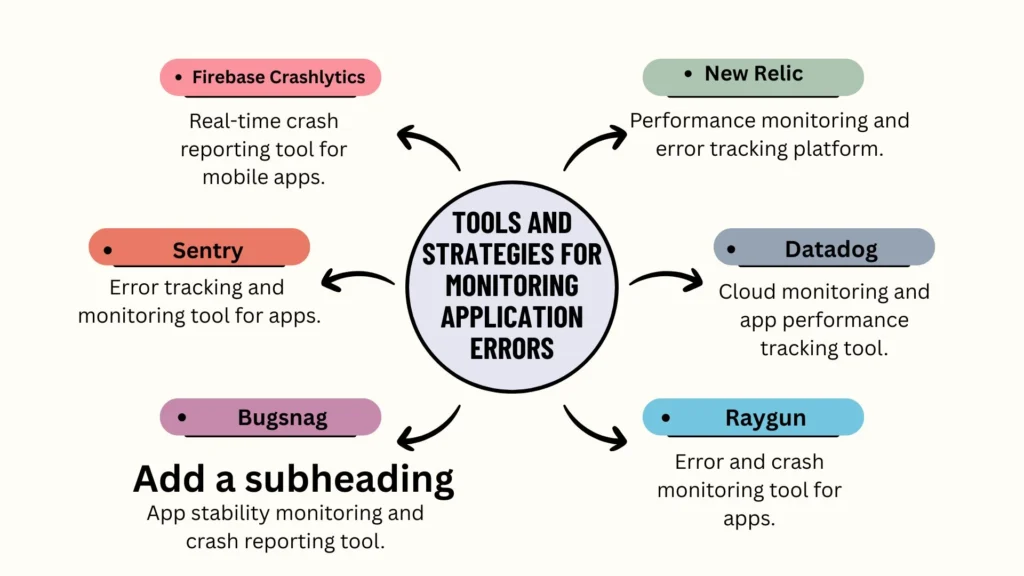
Useful Error monitoring tools include
- Firebase Crashlytics
- Sentry
- Bugsnag
- New Relic
- Datadog
- Raygun
These platforms collect stack traces and device information. They highlight which functions failed and how often the issue appears. This helps handle Fixing application errors with precise data instead of guesswork.
Monitoring tools also help detect memory leaks, slow frames, and broken API calls. These small problems eventually grow into full Application crashes if ignored. Early detection reduces long term damage.
Backend monitoring is also helpful. Server crashes lead to front end failures. Logging systems reflect when traffic spikes or when server components run out of space.
Ensuring Seamless App Functionality Across Multiple Platforms
Cross platform stability is important for modern products. Users expect the same experience regardless of device. If a feature works on Android but fails on iOS this creates inconsistent behavior and more Application crashes.
Multi platform app development requires a unified structure. Code must be flexible enough to adapt to differences in hardware, permissions, and network behavior.
Key steps include
- Using cross platform frameworks
- Code sharing where possible
- Platform specific optimization
- Testing on real devices
- Avoiding risky third party libraries
Device fragmentation is also a large challenge. Hundreds of screens processors and sensors exist. These differences often create Application crashes. Reducing this risk requires smart testing that covers as many variations as possible.
Seamless functionality grows trust. It also reduces frustration because users no longer face unexpected shutdowns on one device and smooth performance on another.
Building Robust, Crash-Resistant Applications for All Environments
Creating crash resistant apps requires solid architecture. Developers must manage both performance and compatibility. When an app handles errors gracefully its avoids failures that would normally lead to Application crashes.
A strong structure uses…
- Clear modules
- Isolated components
- Smart error handling
- Memory safe patterns
- Scalable backend systems
Developers should also avoid functions that depend on a single thread. When everything happens at once, the system becomes overloaded. This leads to slowdowns and sudden failures.
Crash resistant apps also use strong fallback behavior. When a feature fails, the app switches to another option instead of shutting down. This reduces Application crashes and improves user trust.
Security also matters. Poor security can cause crashes during data handling. Stable encryption or safe API usage & permission checks keep everything balanced.
Conclusion
Keeping the apps stable across devices takes steady effort but the results are worth it. When you understand the root causes behind Application crashes. it becomes easier to fix the issues that slow users down. Strong testing or smart optimization and better resource handling reduce most crash problems before they reach real users. Adding clear error logs and using reliable error monitoring tools helps you track hidden problems that usually stay unnoticed until the app fails.
Working across different platforms also adds new challenges especially with cross platform compatibility, cross browser compatibility testing. device fragmentation issues, and OS version compatibility problems. These areas require careful tuning so the app works the same on every system. Stable performance keeps users engaged because they can trust the app to run smoothly without sudden shutdowns.
Good habits like app performance optimization strongs coding practices, and early testing make a big difference. When these steps stay consistent they prevent small bugs from turning into full Application crashes.
FAQ
Q1: Is it normal for apps to crash?
Yes, it is common. Apps crash when they hit bugs, low memory, or compatibility problems, and most issues can be fixed with simple troubleshooting.
Q2: Can low storage cause app crashes?
Yes. When storage is low, apps cannot save data or load essential files, which leads to unexpected crashes and slow performance.
Q3: How to find the reason for any application running slow crashing and how to fix that issue?
Check device storage, update the app, clear cache, and review error logs. Fix it by removing corrupted files, updating the OS, and freeing up memory.
Q4: Does a factory reset fix app crashes?
Yes, sometimes. A factory reset removes corrupted system files and resets settings, which can fix repeated crashes caused by deep system issues.
Q5: Does factory reset fix?
It can fix many performance problems. It wipes old data and restores the device to clean software, which often stops stubborn crashes.
Q6: How do I fix my Android crash?
Clear the app cache, free storage, update the OS, and restart the device. If the crash continues, reinstall the app or reset app preferences.




One Comment